
Next.js Best Practices: structure, organization and efficiency
Learn how to organize routes, layouts, components and architecture in Next.js to build scalable, fast and easy-to-maintain projects. Gain clarity, consistency and development speed.
Efficient folder structure
A Next.js application becomes much easier to maintain when its folder structure is planned with intention. A clear organization reduces coupling, improves readability, and allows new features to be added without confusion or unnecessary rework.
When each directory has a clear purpose, the team quickly understands where to place or find every part of the project. This prevents duplication, improves communication between developers, and keeps the code scalable as the system grows.
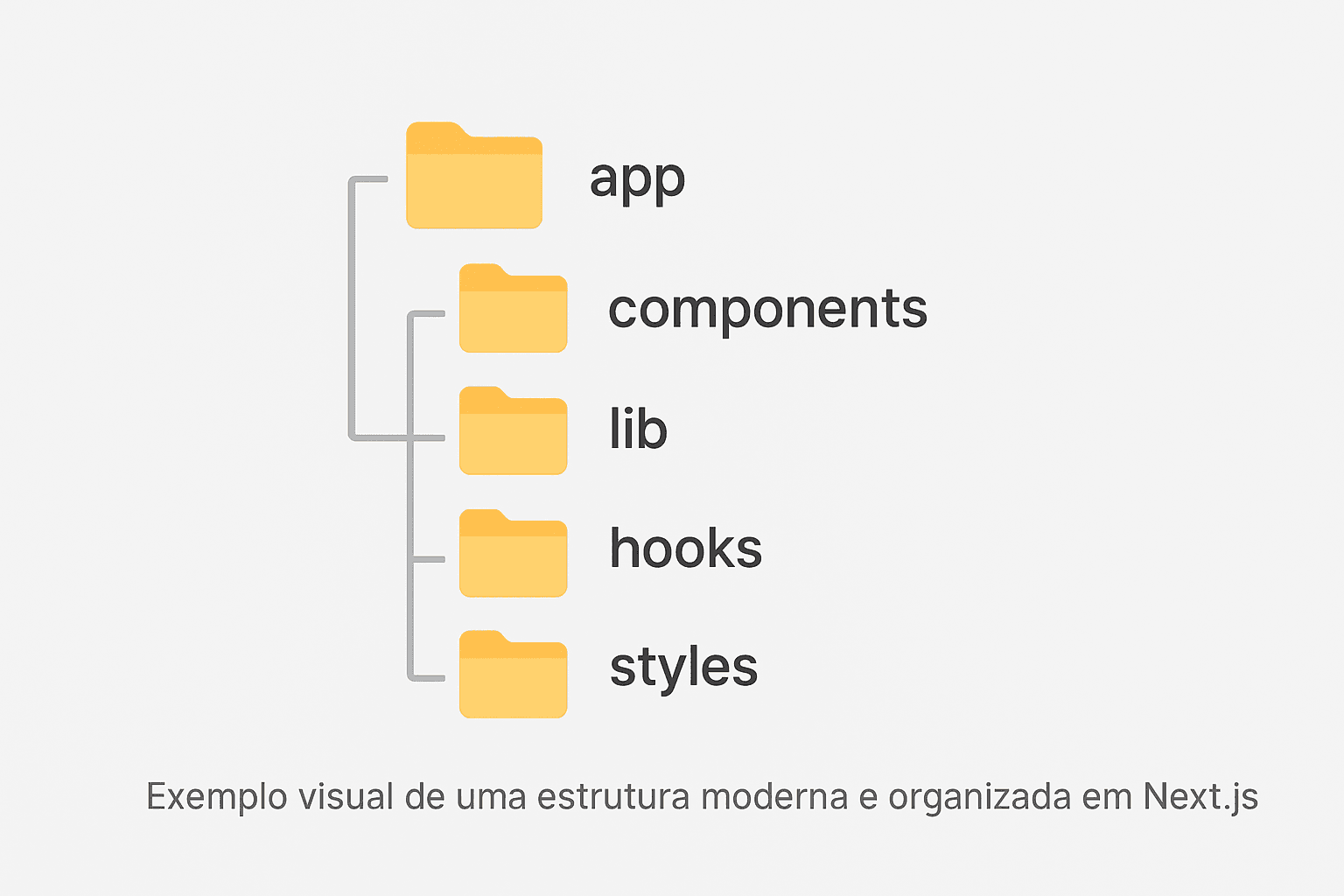
- app/: concentrates routes, layouts, pages, segments, and all logic derived from the App Router. It is the heart of the application and defines how navigation is organized.
- components/: stores reusable and independent components, ensuring visual consistency and reducing duplication across the project.
- lib/: contains utility functions, validations, formatters, business logic modules, and integrations. Everything that represents pure logic and can be reused anywhere.
- hooks/: holds custom hooks that encapsulate reusable behaviors, abstracting details and keeping components smaller and easier to read.
- styles/: centralizes global styles, variables, and resets. Even with Tailwind, this directory remains useful for broad rules or global themes.
- config/: ideal for centralizing configurations such as constants, schemas, environment settings, and external integrations.
- services/: contains services such as API calls, database access (in server-side environments), or external communication logic.
- types/: repository for global types, interfaces, and shared contracts. Keeps TypeScript clean and organized.
Structuring your project this way ensures that each part of the application has a clear place, avoiding oversized folders or unclear responsibilities. This leads to faster development and reduces the risk of inconsistent decisions as the project evolves.
Reusable layouts
The app/ directory introduces one of the most powerful features in Next.js: the ability to define route-specific layouts. This approach makes the application's architecture far more modular, standardized, and easier to scale. Instead of replicating headers, sidebars, footers, or navigation structures across pages, these elements live in a single centralized location and are automatically applied to all dependent routes.
Beyond reducing code duplication, layouts ensure visual consistency, streamline daily maintenance, and improve the overall user experience — since fixed interface sections remain stable during navigation. As a result, your application becomes more organized, predictable, and aligned with modern development best practices.
Use layouts to structure major areas of the website, separate visual contexts, and create independent layers that may include anything from sidebars and internal menus to global wrappers, breadcrumbs, or section-specific behaviors.
- Create a layout for each logical area of the site. Sections like blogs, admin dashboards, or authenticated areas can have their own visual structures.
- Avoid duplicating visual structure. Whenever you notice repeated patterns across pages, move them into a shared layout.
- Centralize wrappers and fixed elements. Components such as containers, top bars, footers, and static columns belong inside the layout, leaving pages responsible only for their unique content.
- Use nested layouts when needed. They allow you to build complex sections where each level introduces its own visual layer.
- Standardize common behaviors. Meta data, theme context, breadcrumbs, and internal navigation can live inside the section’s layout.
Smart componentization
Components should be small, objective, and highly reusable. In Next.js, this philosophy becomes even more powerful thanks to Server Components, which allow you to deliver lighter, faster, and more secure pages. By delegating most of the processing to the server, we reduce the amount of JavaScript sent to the client, improving performance and initial load times.
Smart componentization also involves clearly separating responsibilities: visuals in the right place, logic in the right place, and interactivity only where it is truly necessary. This separation keeps the project clean, predictable, and easier to evolve, especially as the number of components grows.
Use pure components for visual structures, build interfaces from small and independent units, and rely on Client Components only when there is direct interaction with the browser — such as events, controlled animations, local state, or DOM access.
- Prefer Server Components. They reduce the payload sent to the client and improve performance with almost no extra work.
- Use Client Components only when necessary. State, forms, user events, and direct interface manipulation should be the exception, not the rule.
- Clearly separate UI and logic. Keep the presentation layer focused solely on visuals, moving calculations, validations, and data access into isolated functions or server components.
- Avoid oversized components. Whenever something starts to grow too much, break it down into smaller and more specific pieces.
- Reuse visual patterns. Creating small components such as buttons, cards, badges, and wrappers helps keep the interface consistent and standardized.
Development Flow (Git Flow)
Well-structured projects follow a consistent branch pattern to ensure stability, organization, and safety throughout the development process. Git Flow is one of the most widely adopted models because it offers a clear workflow for creating new features, fixing bugs, and preparing releases without compromising what is already in production.
The main idea is to separate environments and assign each branch a specific purpose. This allows teams to work in parallel, review code more efficiently, and avoid unexpected conflicts during critical development stages. Below are the most common branches used in this workflow:
- main: Contains the stable production-ready version of the project. Nothing is merged here without proper review and testing. It is the project's "safe point."
- dev: The development environment, where new resources are integrated before moving on to more extensive testing. Everything currently in progress lives here.
- feature/*: Branches created for each new feature, improvement, or experiment. They keep development isolated until the work is ready to be merged into
dev. - hotfix/*: Used for urgent fixes that need to go directly into the production version. After the fix is applied, the branch is merged into both
mainanddevto keep everything synchronized. - release/*: Created when the project is about to receive a new stable update. These branches allow final adjustments, reviews, and documentation before merging into
main.
Following this workflow helps prevent complex merge conflicts, improves team communication, and creates a cleaner, more readable timeline in the repository. It is one of the most effective practices for keeping code quality high, especially in projects with multiple contributors.
For those who want to deepen their daily workflow with Git and GitHub, there is a simple and straightforward material that shows, in practice, how to apply these concepts without complication. It works very well as a complement for anyone organizing larger projects or looking to improve their development flow.Check out the “Git in Action” eBook.
And if the goal is to follow a more complete path — understanding everything from the basics to a real workflow with examples and best practices applied in everyday work — there is also a course that explores all of this in more detail.See the “Understand Git” course.
Benefits of a Well-Structured Project
Keeping your project structure organized brings practical and noticeable advantages to daily development. When each part of the system is in the right place, the workflow becomes more efficient, the team collaborates better, and the code becomes much easier to evolve over time.
In Next.js applications, good organization helps with everything from page loading to component reuse and implementing new features. This reduces rework, prevents confusion, and gives the project a solid foundation to grow.
- Easier maintenance: Locating files and understanding the purpose of each part becomes quick, enabling smooth fixes and improvements.
- Cleaner components: With clear responsibilities, each component does only what it needs to do, resulting in more readable, reusable, and easier-to-test code.
- Consistent layout: A solid structure encourages visual and behavioral patterns, ensuring the interface feels unified across the entire application.
- Better scalability: Organized projects grow without losing quality. You can add pages, modules, and new features without creating chaos or needing to refactor everything.
- Faster onboarding: New developers understand the architecture quickly, reducing adaptation time and boosting productivity.
- Fewer bugs and less rework: Structural clarity reduces mistakes caused by misplaced files, duplicated logic, or component conflicts.
- Improved performance and mental clarity: Working in a clean environment lowers cognitive load, increasing focus and enabling smarter decisions.
In the end, structure is the foundation of the project. The more solid it is, the more confidence you’ll have to evolve, scale, and maintain healthy code—even in complex applications.
Componentization Patterns
A professional interface starts with well-defined components separated between structure (layout) and content. This ensures organization, proper semantics and scalability. Below you’ll find three essential patterns used in modern projects.
HeroSplit
The most visually striking block on the page. It presents the purpose of the interface, creates identity and sets the tone of the site right at the top.
- Splits content between image and text.
- Quickly communicates the main focus of the site.
- Works as the first visual impression.
export function HeroSplit() {
  return (
    <section className="grid md:grid-cols-2 gap-8 items-center py-16">
      <div>
        <h1 className="text-4xl font-bold">Master Next.js in a simple way</h1>
        <p className="mt-4 text-gray-600">
          Learn modern patterns, folder organization and professional componentization.
        </p>
      </div>

      <img
        src="/hero-image.png"
        alt="Illustration of the Next.js guide"
        className="rounded-xl"
      />
    </section>
  );
}
CardLayout
The layout responsible for the spatial organization of cards. It defines the grid, columns, spacing and responsiveness. It is completely independent from the content.
- Visually distributes elements.
- Keeps consistency across different sections.
- Can be reused on any page.
export function CardLayout({ children }) {
  return (
    <div className="grid sm:grid-cols-2 lg:grid-cols-3 gap-6 mt-6">
      {children}
    </div>
  );
}
CardContent
The internal content of the card: icons, titles, descriptions and links. This is where you define the actual information, keeping it separate from the outer layout.
- Isolates information from the rest of the interface.
- Makes maintenance and content updates easier.
- Prevents duplication and keeps the code clean.
export function CardContent({ icon: Icon, title, description, href }) {
  return (
    <article className="p-5 rounded-xl border bg-white hover:shadow transition">
      <Icon className="size-6 text-blue-600" />

      <h3 className="font-semibold mt-3">{title}</h3>
      <p className="text-gray-600 text-sm mt-1">{description}</p>

      <a
        href={href}
        className="text-blue-600 text-sm font-medium mt-3 inline-block"
      >
        Read more →
      </a>
    </article>
  );
}
Why does this work so well?
Separating layout and content brings immediate advantages to any project:
- Correct use of Next.js with efficient componentization.
- Extreme reuse — less code and more organization.
- Clean and accessible semantics.
- Responsiveness ensured by the layout.
- Easy maintenance and high scalability.
- Improved SEO thanks to clear structure.
Essential dependencies for Next.js projects
Before starting development, it’s common to install some libraries that speed up the workflow. The list below brings together frequently used dependencies in professional Next.js projects.
npx create-next-app@latest .
npm install lucide-react
npm install react-icons
npm install react-hot-toast
npm install axios
npm install date-fns
npm install monitor
npm install prismjs
npm install --save-dev @types/prismjs
npm install framer-motion
npm install chart.js
npm install react-chartjs-2
- create-next-app: initializes a Next.js project configured with TypeScript, ESLint, and the default structure.
- lucide-react: modern, lightweight and fully customizable icons.
- react-icons: a huge collection of icon libraries (FontAwesome, Feather, etc.).
- react-hot-toast: elegant and easy-to-use notification system.
- axios: HTTP client for safer, more reliable typed requests.
- date-fns: lightweight and modular date manipulation.
- monitor: real-time monitoring and logging (when compatible).
- prismjs: code highlighting for pages like blogs and documentation.
- @types/prismjs: TypeScript typings for PrismJS.
- framer-motion: fluid, declarative animations for React.
- chart.js: professional, responsive, and feature-rich charts.
- react-chartjs-2: direct integration between React and Chart.js.